Yours to keep
Pay once. No subscription, and it works offline.
The same forecast as a workbook you own. Every formula is there to see and change. Opens in Excel and Google Sheets, with no macros.
Version 2.0. Opens in Excel and Google Sheets.
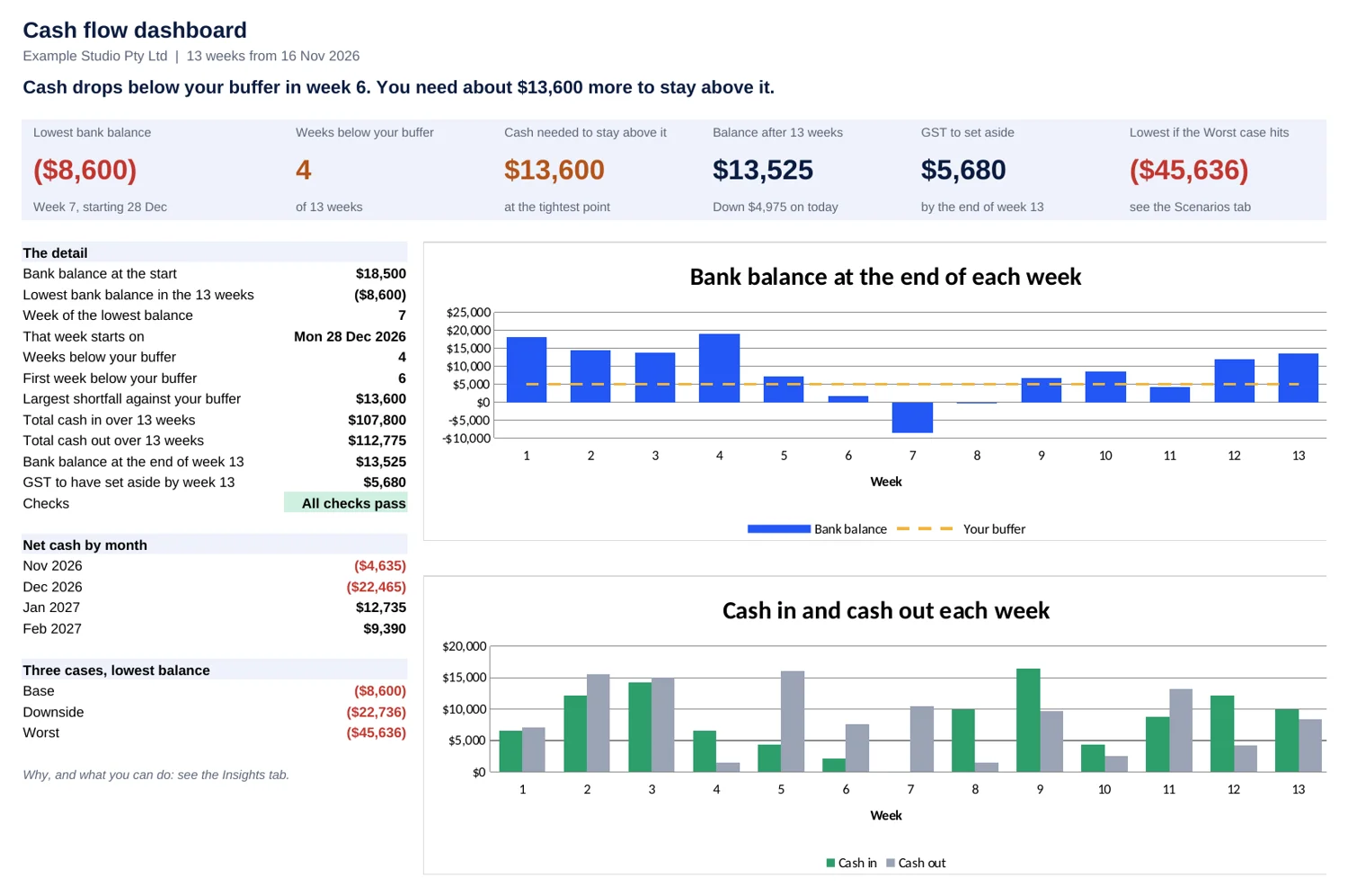
The Dashboard, with the example business. Made-up numbers.
Pay once. No subscription, and it works offline.
No macros and no locked cells. Follow any number back to where it came from, and change it.
The Dashboard prints on a single page, with both charts, for a bank or a business partner.
Twelve checks tell you when a date is missing or something doesn't add up.
One Excel file that also opens in Google Sheets. No macros. The web tool does the same job in your browser.
A one-page report: six headline figures, the detail, net cash by month, the three cases and two charts.
A row for each invoice and bill, with the date you expect it paid. Up to 100 of each.
Wages, super, rent, subscriptions and retainers. Weekly, fortnightly, every 4 weeks, monthly or quarterly.
BAS and other ATO payments by due date, plus the GST building up week by week.
Why the tight week happens, line by line. When money is due, your five largest invoices, and what moving a few dates would cover.
Base, Downside and Worst side by side, each with its own assumptions, on one chart.
Customers paying late, income down, costs up. Change one cell and the whole forecast updates.
The same 13 weeks added up by month: cash in, cash out, net cash and the balance you end each month on.
Each week, note what you forecast and what the bank really showed. See whether your forecasts run hopeful.
Twelve checks that tell you when a date is missing or something doesn't add up, and how to fix it.
In Australian dollars. One payment, and the file is yours to keep.
$49 once
One workbook for your own business
Secure card payment by Stripe. Your download starts straight after.
This is a separate product from CFPilot Pro, which unlocks the web tools. Buying one does not include the other.
Yes. Upload the Excel file to Google Drive and open it with Google Sheets. There are no macros, so it also opens on Windows, Mac and in Excel for the web.
Yes. It is yours to use and change in your own business. Please don't resell or share the file.
No. They are two separate products. CFPilot Pro unlocks the web tools in your browser for a year. The Excel model is a file you buy once and keep. With Pro you can export your own forecast to Excel, but that is a table of your figures, not the model with its formulas.
The download page you land on after paying has an "Email me this link" button. Open that link on your computer and download the file there. The link keeps working.
About 20 minutes the first time. After that, around 10 minutes a week: move the start date forward, update your bank balance and clear what has been paid.
No. The model is a planning tool that gives estimates. Check anything you lodge with your registered tax agent or BAS agent.